What app metadata is, and the part people miss
App metadata is every text and visual field you control in your App Store or Google Play listing: the name, subtitle, keywords, descriptions, icon, screenshots and preview video. The distinction that matters: some fields are indexed for search and some are read by humans, and only a few are both. Writing all of them the same way is why most listings are mediocre at both jobs.
Choosing which terms to put in these fields is a separate job, covered in our App Store keyword research guide.
App Store Metadata, Field by Field
App name. 30 characters. Indexed, heaviest weight, and the most visible thing in search results. The brand plus one descriptive phrase is the standard structure and usually the right one.
Subtitle. 30 characters. Indexed, visible, and the most undervalued field in the store. It is the one place to state the benefit a brand name cannot.
Keyword field. 100 characters. Indexed, invisible to users. Comma separated, no spaces after commas, no repeated words, no words already in the name or subtitle.
Description. Not indexed on the App Store. Written entirely for the human who is already considering, which means the first three lines before the fold carry almost all of its weight.
Promotional text. 170 characters, not indexed, updatable without a release. Where seasonal or campaign messaging goes.
In-app purchase names. Indexed. Frequently forgotten, and free keyword surface.
Google Play Metadata, Field by Field
Title. 30 characters. Indexed, heavily weighted.
Short description. 80 characters. Indexed and visible, so it carries both jobs at once, which makes it the hardest field in either store to write well.
Long description. 4,000 characters and indexed, which is the single biggest structural difference from the App Store. Keyword density matters here and is penalised when overdone. Natural repetition across sections works; stuffing does not.
Where the two stores genuinely differ
Indexed description on Google Play versus a hidden keyword field on Apple, different limits, different update mechanics, different tolerance for repetition. A single metadata set copied between stores underperforms on both.
| Field | App Store | Google Play |
|---|---|---|
| Name or title | 30 characters, indexed, heaviest weight | 30 characters, indexed, heavily weighted |
| Subtitle or short description | Subtitle: 30 characters, indexed and visible | Short description: 80 characters, indexed and visible |
| Keyword field | 100 characters, indexed, invisible to users | No such field |
| Description | Not indexed, written for the human reader | 4,000 characters, indexed |
| Promotional text | 170 characters, not indexed, updatable without a release | No such field |
Not sure how your listing scores on these fields? Run it through our free ASO checker for a quick audit of your listing.
Visual Metadata: Icon, Screenshots and Video
Visual metadata is not indexed for search, but it decides whether a ranking turns into an install.
Icon. Seen in every search result and on the home screen. It has to read at small sizes and stand out against the category, not just look good on its own.
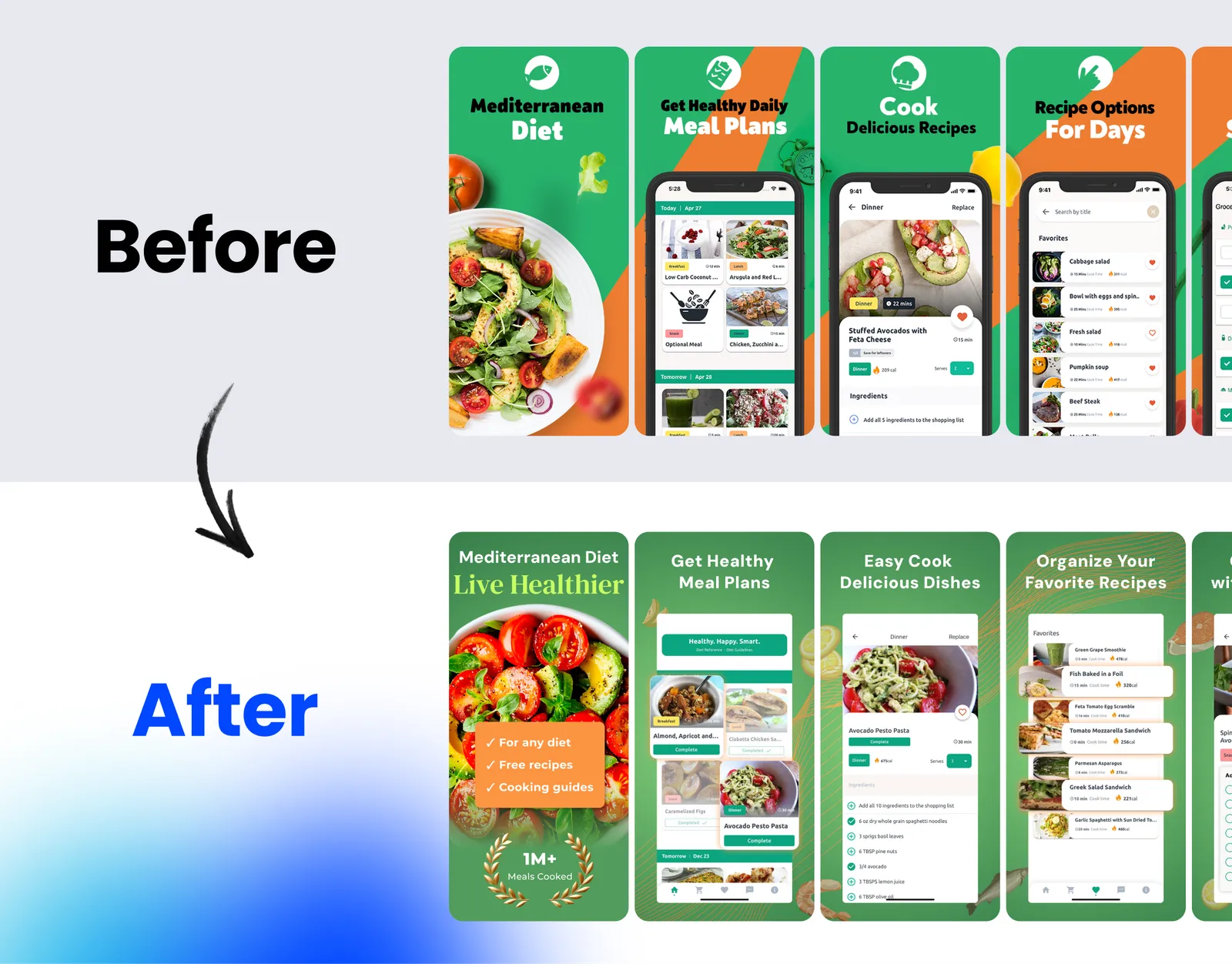
Screenshots. The first two or three do most of the work, because they appear in search results before anyone opens the page. Lead with the outcome the user wants, not the interface. More on this in why your first screenshot does 80% of the work.
Preview video. On the App Store it autoplays muted, so the first three seconds must make sense without sound. On Google Play it sits behind a play button, which makes it less influential.
Custom product pages and custom store listings. Both stores let you build alternative listings for specific keywords, campaigns or countries. Matching the page to the intent behind the traffic often lifts conversion more than any single text change.
Metadata Optimisation: How to Write Each Field
Lead the name with the brand, follow with the job. Not a feature list crammed into 30 characters.
Write the subtitle for the person, the keyword field for the algorithm. They are different audiences and treating the subtitle as extra keyword space wastes the most persuasive line you have.
Put the value in the first three lines of the description. Everything after the fold is read by a minority.
Localise rather than translate. A translated listing ranks for translated terms, which are frequently not the terms people in that market search.
Updating metadata without losing what works
Change one field at a time where traffic allows, otherwise attribution of the result is guesswork.
Record a baseline first: impressions, product page views, conversion rate and ranked keywords.
Expect a re-indexing lag. Ranking changes take days to settle, and judging within 48 hours produces reversals that cost more than the original change.
Watch conversion as well as ranking. Metadata that lifts rankings and lowers conversion is a net loss, and it happens whenever a listing is optimised for the algorithm alone.
If you would rather hand the whole listing to one team, our app store optimization agency runs metadata, creative testing and localisation as one system.
App Metadata Optimisation Checklist
- App name: brand plus one descriptive phrase, within 30 characters
- Subtitle (iOS) and short description (Google Play): the main benefit, written for people
- Keyword field: no spaces after commas, no words repeated from the name or subtitle
- Description: value in the first three lines; on Google Play, natural keyword use throughout
- First three screenshots: the core outcome, readable in search results
- Localised listings for every priority market, with market-specific keywords
- A recorded baseline before each change, and one field changed at a time
FAQ
What are the App Store and Google Play metadata character limits?
On the App Store: app name 30 characters, subtitle 30, keyword field 100, promotional text 170 and description 4,000. On Google Play: title 30 characters, short description 80 and full description 4,000.
Does the app description affect App Store ranking?
No on the App Store, where the description is not indexed. Yes on Google Play, where the long description is indexed and carries real weight. This is the difference that most often trips teams moving between the two.
How many keywords fit in the App Store keyword field?
100 characters, which is roughly 15 to 20 terms if you drop spaces after commas, avoid repeating words already in the name and subtitle, and do not repeat plurals the algorithm already handles.
How often should app metadata be updated?
When you have a reason: a new feature, a seasonal peak, a ranking decline, a new market. Routine churn without a hypothesis resets your learning and makes results unattributable.
What is the difference between metadata and ASO?
Metadata is the text and assets you control. ASO is the whole discipline, including keyword research, creative testing, conversion and localisation. Metadata is the part you write; conversion is the part you test.