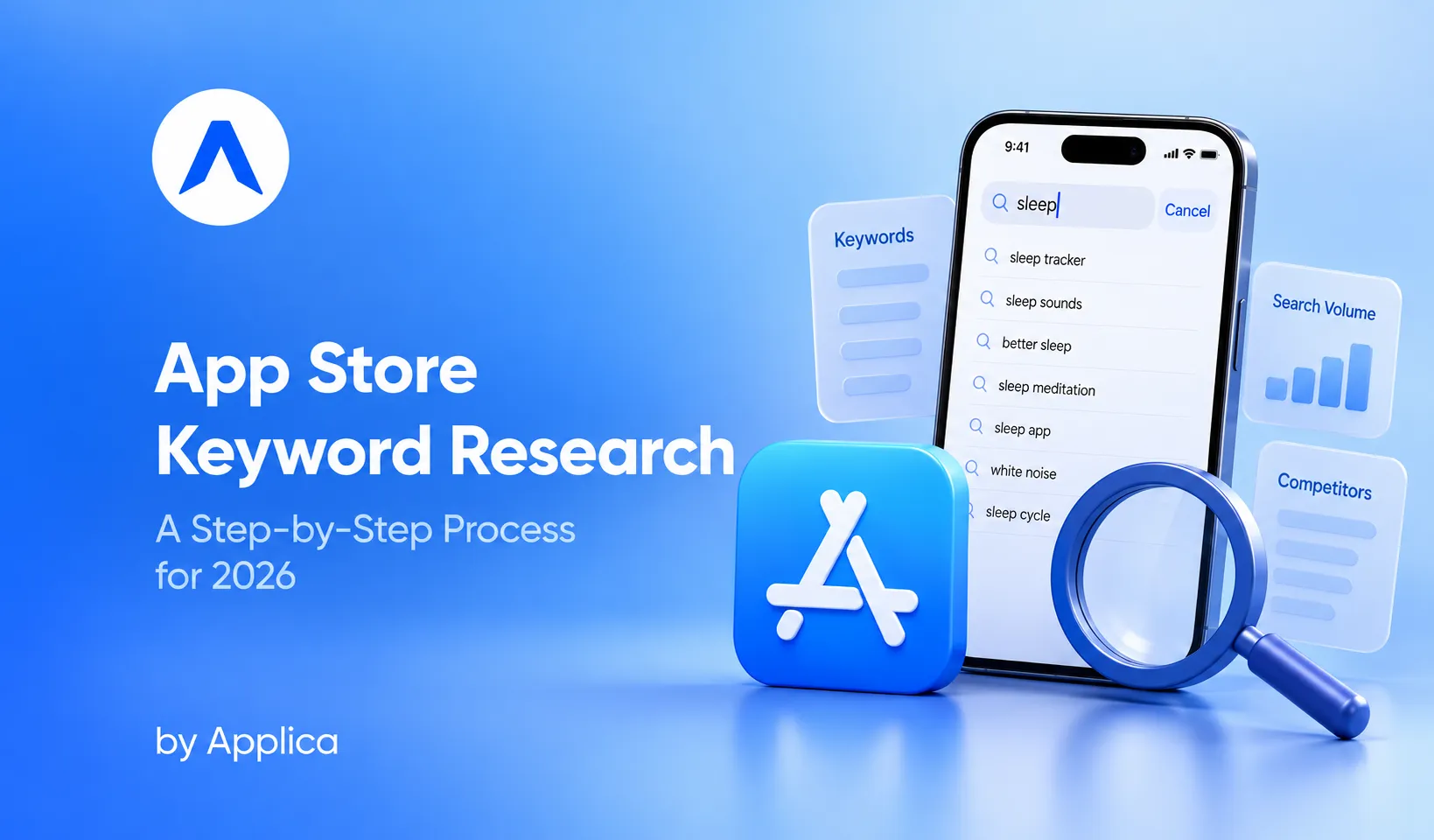
Apple confirms that the majority of App Store downloads begin with a search, a share the company has reported at roughly 65 to 70 percent in its own Search Ads materials. Yet the store indexes only three text fields to decide who ranks for those searches: your app name, your subtitle, and a hidden 100-character keyword field. That asymmetry is the whole game. You have a very small surface to work with, and a very large amount of demand flowing through it.
Which is why app store keyword research is actually a metadata-architecture problem, not a keyword-picking exercise, because how you cluster, cross-localise, and place terms across indexed fields decides how many relevant searches your app can rank for. Most guides stop at "build a list, sort by volume, pick the winners." That is table stakes, not strategy.
This is a complete, practitioner-grade process: how the store reads your metadata, how to build keyword clusters, how cross-localisation multiplies your indexed coverage, where to source terms, and how to audit what you already rank for so you can reallocate it deliberately. The goal is not a longer list. It is a stronger structure.
Which fields does the App Store index for keywords?
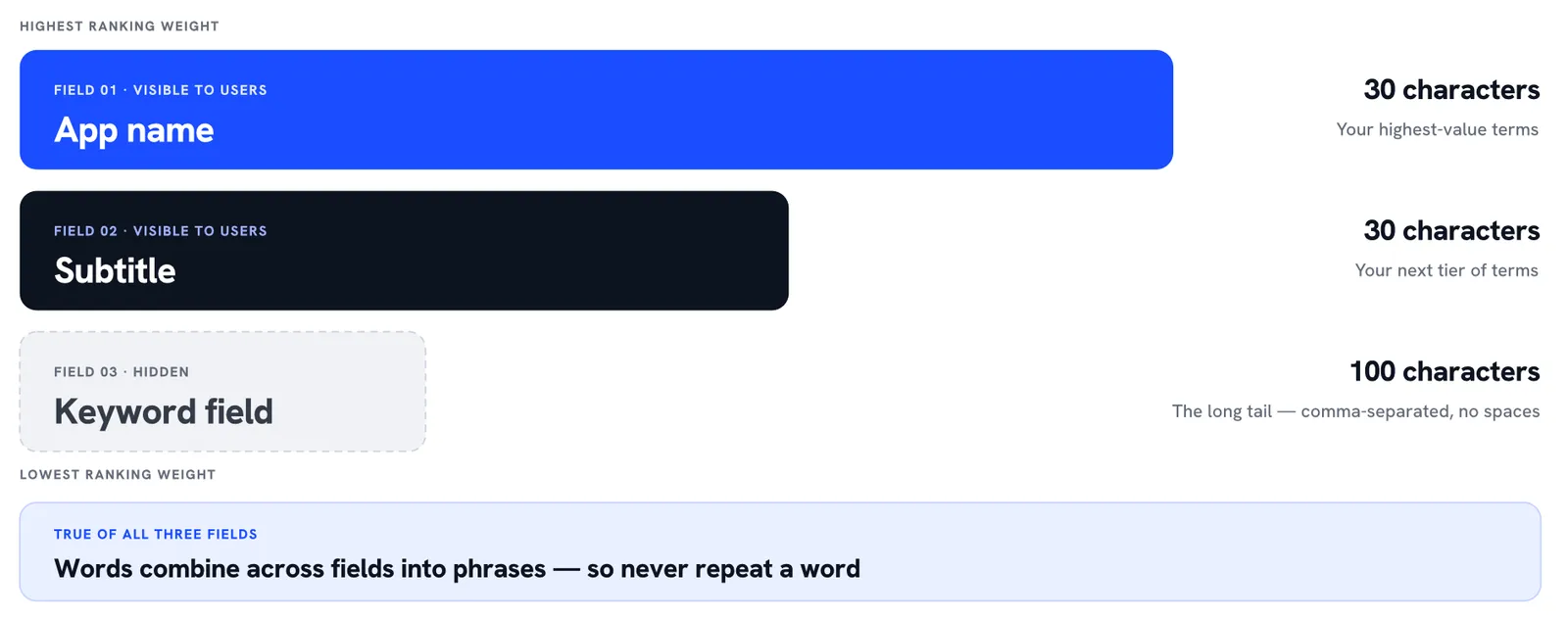
The App Store indexes three text fields for keyword matching: the app name, the subtitle, and the hidden 100-character keyword field. According to Apple's own guidance, search results combine that text relevance with user behaviour signals such as downloads, ratings, and reviews. Everything else in your listing, screenshots, description, in-app events, influences conversion or eligibility, but those three fields are what you actually place keywords in.
That is a deliberately narrow surface. Understanding how the store reads it is the precondition for every decision that follows.
The three fields and their relative weight
The three writable text fields are not equal in ranking power. Practitioner consensus, reinforced across most ASO ranking-factor breakdowns, holds that the app name carries the most weight, the subtitle comes next, and the keyword field carries the least. Apple does not publish these relative weights, so treat the hierarchy as a strong working model rather than a documented fact. The practical implication is stable regardless: your highest-value terms belong in the title, your next tier in the subtitle, and the long tail in the keyword field.
This is also where app metadata best practices intersect with keyword strategy. The fields that rank you are the same fields a user reads before tapping, so the title and subtitle carry a double burden: they have to index well and convert well at the same time. The keyword field is the only one you can optimise purely for the algorithm, since users never see it.
How iOS combines terms across fields
On iOS, the algorithm combines individual words across your indexed fields to form searchable phrases. If your title contains "budget" and your keyword field contains "planner," you can surface for "budget planner" without ever writing that exact phrase. This is the single most important mechanic in the entire process, and it changes how you fill the fields.
Because terms combine, you never repeat a word. Apple specifies that the keyword field holds 100 characters, separated by commas, with no spaces between terms. Every character spent duplicating a word already in your title is a wasted character. Skip plurals of words you already use, skip generic filler like "app" or "the," and avoid re-stating anything indexed elsewhere. The field is not a place to restate your positioning. It is a place to add the words your title and subtitle could not fit.
The discipline this imposes is worth naming: with only 100 characters and a no-repeat rule, the keyword field rewards words that combine with terms you have already placed. Think in components, not phrases. If "budget" and "planner" both need to appear, put one in the subtitle and the other in the keyword field, and let the algorithm assemble the phrase. Writing "budget planner" in full spends characters on a combination the store would have formed for free.
Start with keyword clusters, not a flat list
A keyword cluster is a group of related terms organised around a single search theme or user intent, rather than a flat spreadsheet sorted by volume. Clusters are how you make sure your metadata covers a feature or an intent completely, instead of ranking for one strong term and missing the ten adjacent ones users actually type.
The reason to start here is coverage. A flat list pushes you toward the few highest-volume head terms and quietly ignores the breadth of ways people search. Clusters force you to map the territory first, then decide which terms make it into limited field space.
What a cluster looks like
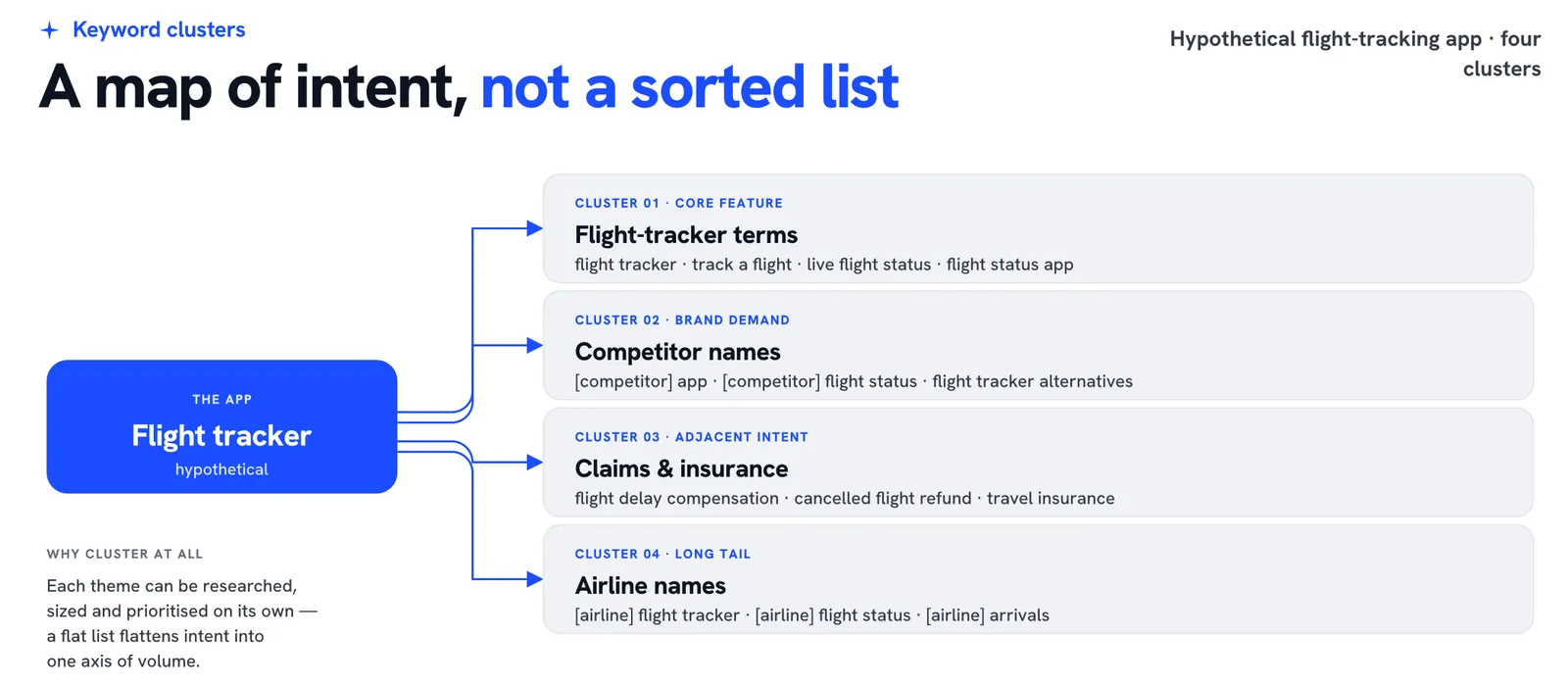
Take a hypothetical flight-tracking app. Its clusters might include flight-tracker terms ("flight tracker," "track a flight," "live flight status"), competitor brand names, a claims-and-insurance cluster ("flight delay compensation," "cancelled flight refund"), and an airline-names cluster (the carriers users search alongside tracking features). Each cluster represents a distinct slice of intent, and each can be researched, sized, and prioritised on its own.
Built this way, your keyword list stops being one ranked column and becomes a map of the demand around your app. When you later decide what goes in the title versus the keyword field, you are allocating from a structured picture of intent, not guessing from a sorted list. This is the difference between covering a category and ranking for a handful of its words.
Clusters also make prioritisation tractable. Once each theme is mapped, you can size the clusters against each other: which represents the most convertible demand, which is winnable given your current ranking strength, and which is worth defending. A single flat list cannot answer those questions because it flattens intent into a single axis of volume. Clustered, your research tells you not just which terms are strong, but which parts of the category you can realistically own.
What is cross-localisation, and why does it multiply your indexed keywords?
Cross-localisation is the practice of adding keywords in a storefront's secondary languages so that a single storefront indexes far more terms than its primary language allows. Each App Store territory has a primary locale and several secondary locales that Apple also crawls for ranking, which means you can rank for terms placed in languages your users never see displayed.
The leverage is large, which is why it is one of the highest-return moves in the entire discipline. It is pure metadata planning: no new creative, no new spend, just more indexed surface.
The US-storefront example
In the US storefront, Apple indexes nine secondary locales alongside English (US), including Spanish (Mexico), Brazilian Portuguese, French, and several others. Each locale provides its own 30-character name, 30-character subtitle, and 100-character keyword field. Activating those secondary locales can expand your indexable character budget from 160 characters to roughly 1,440, close to a tenfold increase in keyword space for the same storefront.
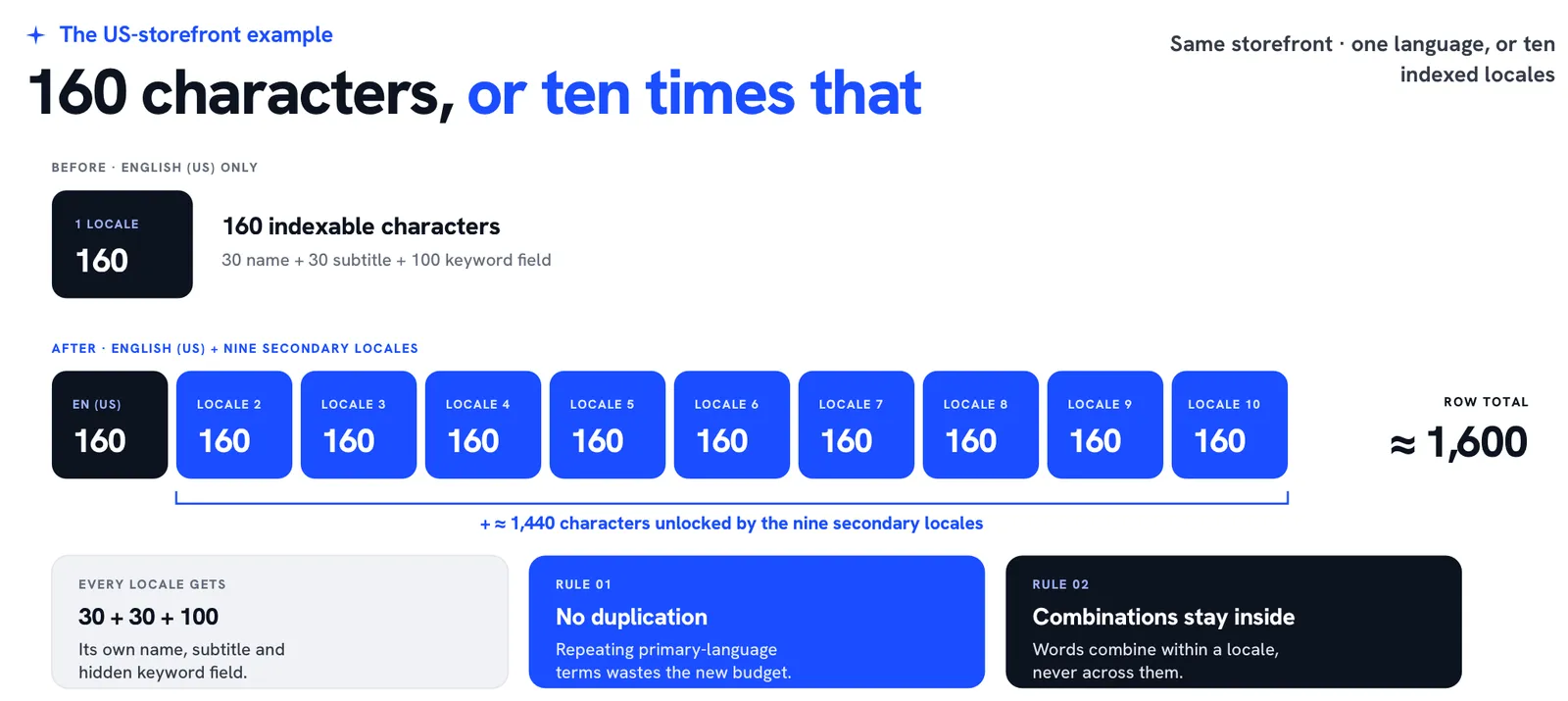
Two rules make this work. First, each locale should hold distinct keywords; duplicating your primary-language terms across locales wastes the budget you just unlocked. Second, keyword combinations only form within a single locale, not across them, so you plan each locale as a self-contained set of terms that combine internally. Done well, cross-localisation widens the number of searches you index for without touching a single word your users actually read.
A step-by-step App Store keyword research process
With the structure in place, sourcing becomes the tactical layer: filling the clusters with real terms, then sizing them. If you are starting from scratch, build a separate list per cluster and populate each from multiple signals rather than a single tool. No one source sees the whole picture.
Source from ASO tools, competitors, Apple Search Ads, and AI
Four signals cover most of the field. ASO platforms such as AppTweak, Sensor Tower, or MobileAction give you volume and difficulty estimates to size terms. Competitor analysis shows which keywords your rivals already rank for, which is often the fastest way to find terms you have missed. Apple Search Ads is the highest-fidelity signal of the four: its Search Popularity score is Apple's own measure of demand, and running even a small campaign reveals real search volume and lower-funnel data like taps and conversions for specific terms.
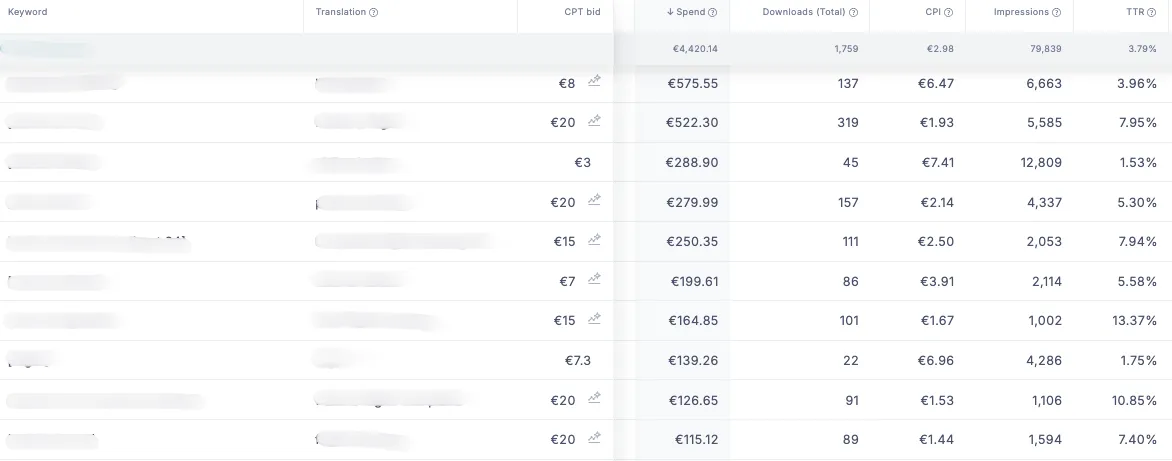
That last point is why ASO and Apple Search Ads are one system, not two channels. The paid side is the cleanest volume-and-intent instrument you have for the organic side, and treating them separately leaves the best keyword data on the table. The same logic runs through your broader funnel: ASO and user acquisition are one feedback loop, and paid campaign data is a legitimate source for organic keyword discovery. Finally, AI is useful for expansion, not judgement: given a seed list, it can generate adjacent terms and new combinations quickly, which you then validate against real volume. AI widens the net; the volume data decides what to keep. This is part of what has reshaped the sourcing step in 2026, where AI-assisted expansion and richer Search Ads data changed the method, not the fundamentals.
Short-tail, long-tail, and Apple auto-suggestions: which should you target?
Short-tail keywords are high-volume, high-competition head terms; long-tail keywords are specific multi-word phrases with lower volume but sharper intent and less competition. Which you target depends on your app's current strength, not your ambition. A low-traffic app rarely ranks for competitive head terms, so the productive move is to focus on long-tail phrases, or terms competitors are not defending, that still carry meaningful, convertible traffic.
Apple's own search auto-suggestions are one of the best long-tail sources available, because they surface phrases users are actively typing, complete with real intent. Mining auto-suggestions tells you how demand actually phrases itself, which is often different from how your team would describe the feature. It is a direct read on real user intent rather than assumed intent. And when you run Apple Search Ads, you can confirm which of those long-tail phrases genuinely drive trials and conversions, closing the loop between what looks promising and what pays. The strategic answer is rarely short-tail or long-tail in isolation. It is a deliberate mix, weighted toward the long tail while your traffic is still building.
Audit and reallocate: Attacking, Defense, and New opportunities
The audit is where keyword research pays off: you review the terms you already use, check whether they are indexing and how they rank, then decide whether to keep each one, reposition it, or remove it. This is the step generic guides skip, and it is where the real prioritisation happens, precisely at the moment you decide what to move where.
Sorting existing keywords into three groups makes the reallocation decisions obvious.
The three buckets
Attacking keywords are terms where you rank in the middle of the pack while competitors rank higher. These are your promotion candidates: moving an attacking term into a higher-weight field, from the keyword field into the subtitle, or from the subtitle into the title, gives it the ranking power to close the gap. Defense keywords are terms where you already rank well, ideally Top 5, but where you see movement and competitors are pressing. These you protect, making small adjustments to hold position, ideally inside the Top 3. New opportunities are terms neither you nor your competitors currently target, open space you can claim before the category contests it.
An illustrative keyword audit showing how terms can be promoted, protected or introduced based on current rankings and metadata placement - Sample data only
| Bucket | Keyword | Your rank | Top competitor rank | Current field | Recommended action |
|---|---|---|---|---|---|
| Attacking | flight tracker | #18 | #3 | Keyword field | Promote to app name |
| Attacking | airplane tracker | #24 | #7 | Not used | Add to subtitle |
| Defense | live flight status | #3 | #5 | Subtitle | Retain and monitor |
| Defense | track a flight | #5 | #2 | App name | Protect in app name |
| New opportunity | delayed flight tracker | Not ranked | #14 | Not used | Test in keyword field |
| New opportunity | airline delay alerts | Not ranked | #21 | Not used | Add to keyword field |
Alt: Keyword audit table sorting terms into Attacking, Defense, and New-opportunity groups with reallocation actions.
Run against a clustered, cross-localised keyword set, this audit turns metadata into a living structure you reallocate over time rather than a one-time setup. As Applica's ASO lead frames it:
Keyword choice matters, but structure matters even more. The biggest ranking gains come from how you cluster keywords, place them across fields, and use localization to expand coverage.
© Yuri Meggiolaro, ASO & ASA Manager at Applica
What to expect across iterations
One honest caveat separates a good process from an overpromised one. If this is your first serious metadata optimisation, the initial pass usually produces the largest jump in store traffic, because you are correcting years of unindexed or poorly placed terms at once. That is exactly when conversion-readiness matters most: a surge of new impressions is wasted if your listing does not turn them into installs, so app store conversion optimisation should be in place before the traffic arrives. If your conversion rate is not ready, the extra visibility leaks straight back out.
After that first iteration, the gains get smaller and the work gets more precise. You move from correcting obvious gaps to hunting real, incremental opportunities, promoting an attacking term here, defending a slipping one there, testing a new-opportunity cluster. The impact per cycle shrinks, but it compounds, and it is still worth doing. Expecting a permanent first-sprint curve is how teams talk themselves out of the ongoing work that actually sustains rankings.
Cadence matters more than intensity here. Keyword rankings move as competitors adjust their own metadata and as seasonal demand shifts, so the audit is not a quarterly project but a standing rhythm: check indexing and positions on a regular schedule, and make small, evidence-led field changes rather than infrequent full rewrites. Each metadata submission is also a chance to read the store's response, since rankings shift after every update, which makes disciplined, incremental change more legible than sweeping ones. The teams that hold Top 3 positions are rarely the ones with the cleverest single keyword list. They are the ones auditing and reallocating while everyone else treats metadata as set-and-forget.
Build the structure, then reallocate
The three fields Apple reads are small and fixed, and what separates apps that rank from apps that do not is rarely access to better keywords: it is a more deliberate structure for placing them across fields and markets. Build clusters to map demand, cross-localise to widen what you index, source from multiple signals, then audit what you rank for and reallocate it.
Explore a full App Store Optimization audit to find where your indexed coverage is leaking relevant searches.